|
|
Reviews
Apple PowerBook G4 15''
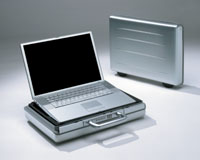 Itās
a mixed blessing, really. Iāll miss that cool grey titanium shell,
a design move that turned the laptop world on its ear two years
ago. But it was inevitable that the 15" model would join itās 12"
and 17" siblings in the robust new aluminum enclosure, a design
that offers far more than a different shade of metal. Itās
a mixed blessing, really. Iāll miss that cool grey titanium shell,
a design move that turned the laptop world on its ear two years
ago. But it was inevitable that the 15" model would join itās 12"
and 17" siblings in the robust new aluminum enclosure, a design
that offers far more than a different shade of metal.
As
enticing as the titanium model was, it had its problems. The painted
coating was prone to unsightly chipping at the corners, the dual
hinge arrangement was occasionally troublesome, and the thin shell
would deflect when held by one corner. The aluminum case, derived
from the single-hinge polycarbonate design of the second generation
iBook, is stronger, more durable, and even sleeker than its predecessor.
The metal is anodized rather than painted, so the surface treatment
is actually part of the metal itself. Plastic edging rims the inner
surfaces, adding further protection to these trouble spots. And
the massive  single
hinge is extremely stout, with the bonus of sitting lower once opened
÷ frequent fliers, rejoice! The new 15" comes in two speeds, 1GHz
($1999) and 1.25GHz ($2599) ÷ the latter being the model I purchased
from an Apple Store. Both come equipped with 512K SRAM on-chip L2
cache, a 167MHz system bus, and two 333MHz DDR SDRAM slots with
a capacity up to 2GB. Drive options include 60GB, 80GB, and a custom
order high-speed 80GB 5400-RPM mechanism. The 1.25GHz model comes
standard with the slot-loading DVD-writing SuperDrive, while the
slower model has the DVD-reading Combo drive; the SuperDrive is
a custom order option on the 1GHz. The faster model has AirPort
Extreme built-in, while on the 1GHz itās optional. single
hinge is extremely stout, with the bonus of sitting lower once opened
÷ frequent fliers, rejoice! The new 15" comes in two speeds, 1GHz
($1999) and 1.25GHz ($2599) ÷ the latter being the model I purchased
from an Apple Store. Both come equipped with 512K SRAM on-chip L2
cache, a 167MHz system bus, and two 333MHz DDR SDRAM slots with
a capacity up to 2GB. Drive options include 60GB, 80GB, and a custom
order high-speed 80GB 5400-RPM mechanism. The 1.25GHz model comes
standard with the slot-loading DVD-writing SuperDrive, while the
slower model has the DVD-reading Combo drive; the SuperDrive is
a custom order option on the 1GHz. The faster model has AirPort
Extreme built-in, while on the 1GHz itās optional.
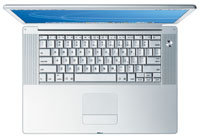
 When
Apple introduced the 17ä PowerBook last year, the biggest crowd
pleaser was the stunning fiber-optic backlit keyboard and ambient
light sensor to auto-adjust illumination when necessary. The new
15" model offers this delightful feature standard on the faster
model and as a custom order option on the slower. If you are considering
the 1GHz model, I urge you to pony up the additional C-note for
the backlit keyboard. It is a useful thing that youāll never regret. When
Apple introduced the 17ä PowerBook last year, the biggest crowd
pleaser was the stunning fiber-optic backlit keyboard and ambient
light sensor to auto-adjust illumination when necessary. The new
15" model offers this delightful feature standard on the faster
model and as a custom order option on the slower. If you are considering
the 1GHz model, I urge you to pony up the additional C-note for
the backlit keyboard. It is a useful thing that youāll never regret.
Stay
connected
Bluetooth wireless is now built in, enabling easy communication
with dozens of mobile phones, Palm PDAs, and other Bluetooth-equipped
accessories such as Appleās wireless keyboard and mouse. My testing
of AirPort Extreme using an AirPort Extreme Hub ($249) and a cable
modem was impressive, with strong signal and more throughput than
my cable modem could provide. (Itās nice to know that any speed
bottleneck is the cable companyās issue and not the result of any
deficiency in my equipment.) Standard wired com ports include 1000BASE-T
(gigabit) Ethernet and a V.92 modem for when all else fails.
 Other
new and improved features are a faster video subsystem, improved
audio support, and two new high-speed data ports. The ATI Mobility
Radeon 9600 processor with AGP 4X support and 64MB of dedicated
DDR RAM. This setup supports external monitors at up to 2048x1536
pixels with millions of colors. The 15.2 widescreen display is the
same resolution (1280x854 pixels) as the last Titanium model, offering
the same ultra-bright crispness and superb off-axis viewability. Other
new and improved features are a faster video subsystem, improved
audio support, and two new high-speed data ports. The ATI Mobility
Radeon 9600 processor with AGP 4X support and 64MB of dedicated
DDR RAM. This setup supports external monitors at up to 2048x1536
pixels with millions of colors. The 15.2 widescreen display is the
same resolution (1280x854 pixels) as the last Titanium model, offering
the same ultra-bright crispness and superb off-axis viewability.
Audio
people like me appreciate the improved support in the new 15", with
the audio input jack from the Titanium, improved stereo speakers,
and a third midrange speaker to fill out the sound. For the fullest
possible sound without plugging in external speakers, consider adding
Octiv Volume Logic 1.0 ($19.95 from www.octiv.com). This iTunes
plug-in uses a high-grade software compressor-limiter to bring up
the lows that would otherwise be inaudible. The
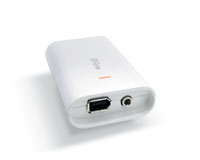
new 15" has new two high-speed USB 2.0 ports and a 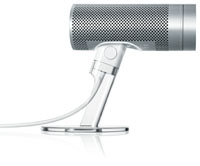 new
ultra-fast FireWire 800 port to complement the standard FireWire
400 port. new
ultra-fast FireWire 800 port to complement the standard FireWire
400 port.
In
the pen computing department, Panther offers no apparent improvments
to InkWell, the legendary Newton print recognizer that was incorporated
into OS X 10.2 ćJaguarä. Apple claims InkWell is now part of the
operating system in order to assist graphics tablet-using designers
to enter text without using a keyboard, but the pen computing community
feels it is there as insurance in case Microsoftās Tablet PCs take
off. Time will tell if Apple will decide to offer a touchscreen
portable, but if they do the worldās finest recognition system will
be just a penstroke away.
 Spotted
Apples Spotted
Apples
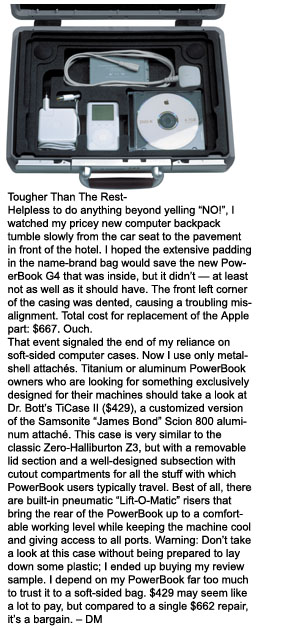
While I am completely satisfied with my new PowerBook, it took a
few days for AppleCare to get all the bugs out. My new 15", like
thousands of others bought by early adopters, shipped with flawed
LCD panels displaying nasty white splotches at regular intervals
across the screen. A quick call to Apple and my machine was whisked
overnight to Texas, where it received a flawless new LCD panel and
shell. Through no fault of Appleās, I also had them replace the
lower shell section due to a travel mishap (see sidebar). After
the longest week I can remember, Airborne delivered my PowerBook,
better than new.
Must-have
accessories
No PowerBook is an island. The complete experience requires a few
carefully chosen accessories. The many virtues of Dr Bottās superb
TiCase II 15" are detailed in the sidebar, but what are you going
to fill those cubbies with?
Most
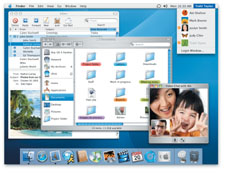
importantly, be sure you get your free upgrade to Mac OS X.3 ćPantherä
if your machine does not come with it already installed. Panther
is a total delight, with useful new features like ExposŽ window
management, iChat AV, and overall faster, smoother performance.
Youāll want an Apple iSight video camera ($149), as well. If you
donāt have external speakers, I suggest pairing the attractive,
great sounding Apple Pro Speakers ($59) with the iFire interface/amplifier
from Griffin ($39.95, www.griffintecchnology.com).
Need
the perfect backup drive? Check out the beautifully designed Mercury
80GB FireWire drive from Other World Computing, ($299, www.macsales.com)
a sleek, acrylic-encased 2.5" drive that is ultra-quiet and conveniently
powered from your FireWire port. The Mercury is clearly the coolest-looking
external drive ever made and has excellent performance to boot.
 For
stabilityās sake, I prefer to keep my Macs 100% Microsoft-free,
so Iāve looked at all the Microsoft Office-compatible alternatives
on the market and have three to recommend. For writing I rely on
Nisus Writer Express, ($59.95, www.nisus.com) a delightfully attractive,
satisfyingly fast thought conductor that can read and write Microsoft
Word files. For spreadsheet duty I use AppleWorks ($79) as it reads
and writes Excel documents flawlessly while offering all the features
Iāll ever need. And for presentations you canāt do better than Apple
Keynote ($99), easily the most powerful presentation software for
any computing platform. For
stabilityās sake, I prefer to keep my Macs 100% Microsoft-free,
so Iāve looked at all the Microsoft Office-compatible alternatives
on the market and have three to recommend. For writing I rely on
Nisus Writer Express, ($59.95, www.nisus.com) a delightfully attractive,
satisfyingly fast thought conductor that can read and write Microsoft
Word files. For spreadsheet duty I use AppleWorks ($79) as it reads
and writes Excel documents flawlessly while offering all the features
Iāll ever need. And for presentations you canāt do better than Apple
Keynote ($99), easily the most powerful presentation software for
any computing platform.
öDavid
MacNeill (dave@digicamera.com)
Home
|