 |
|
|||||||||
|
|
Reviews
NIK Sharpener Pro 2.0 and Color Efex nik Sharpener and nik Color Efex are related in that both use the same interfaces to accomplish their magic. A good size window with controls and options comes up when you access them through the filters menu. If you access them through File>Automate, you get the selective menu, which automatically creates a second layer with a built in black mask. You can then paint with a white brush in the mask to apply the effect selectively or hit the fill button on the window to apply it overall. Let me start with the sharpener. There are a number of ways to sharpen your photos in Photoshop. CS2 has introduced a new option called Smart Sharpen along with the Unsharp Mask. I've been using the unsharp mask for years, but the question is always "How much to sharpen?" Sharpening needs to be customized to the final product. Is it inkjet, or for display on the internet or a slide show, or is the photo for reproduction in a magazine or newspaper, or is the photo being given to a lab for an output on Fuji Pictography, Litejet, Durst Lambda or on a Fuji Frontier at your local Costco or Walmart? All this matters. It is best to do all your adjustment work on your photograph first, save a master version for your files and apply the sharpening you need based on your output last. That depends a lot on not only your output printer but also the size, viewing distance, etc. You might be sharpening the same photograph in different ways for different purposes. Thatās why itās a good idea to save a master file. I ran some tests and found that the inventors of nik Sharperner have added just the right amount of sharpening for optimum inkjet prints. This generally looks over sharpened on the monitor, but the print is perfect. If you tried to accomplish this without this set of filters, youād have to guess how it should look on the screen. Oversharp, but how much? In addition to the excellent selective sharpening feature, there is an advanced mode as well. This allows you to sample colors in your photograph with an eyedropper and set sharpening amounts to each color from zero to 100%. For instance, in many landscapes, you might want to select the blue sky and set the sharpening to zero, while trees or foliage might be sharpened considerably. You can even access the analysis mode to get a preview of the areas selected for different amounts of sharpening. The filters work in 16 bit mode as well as 8. A new feature is Raw Presharpening. This is the only sharpening you want to do before you start adjusting the color and tonality of your image, and only on digital files that were shot raw. Digital cameras build in some sharpening if you are shooting jpegs or even tiffs. Raw files are not sharpened by the camera and what raw presharpening does is restore this slight loss in quality. Also, if you have a picture with a noise problem and you are using either Photoshopās noise suppression or a third party filter to do this, definitely do that before final sharpening. Sharpening is always last. NikSharpener Pro 2.0 Complete Edition sells for $329.95. An inkjet edition sells for $169.95 but omits the continuous tone and halftone settings. www.nikmultimedia.com lists more details and a comparison between the two packages. Now on to the nik Color Efex Pro 2.0 package. This software will keep you busy for weeks, even months, trying the various effects. The full package contains 75 different filters (and variations within each one) that are useful, creative, and even startling. The complete version sells for $299.95, but there are a handful of versions at various lower prices, the difference being the number of filters included. Again, visit the nik site for complete details and descriptions. Once installed, the filters appear under the filter menu in two parts ö stylizing and traditional. I only tried a few in the couple of weeks that Iāve been using Color Efex. There are a number of utilitarian filters such as B/W conversion, Skylight Filter, Classical Soft Focus, Fog, a number of Bi-Color combinations, a number of Graduated color filters, etc. Then there's the Sunshine filter, which makes a cloudy day sunny (as the song goes). The next filter I used, Indian Summer, really amazed me. I tried it on a distant Central Park scene, which was shot in early summer. It had a lot of green grass. The filter, in one step, turned it into autumn. The startling thing was that it transformed the green grass into autumn orange and brown without changing the colors of the people or their clothing very much. How does it do that????? It would be a major job to isolate the figures of all the people as a selection and then shift the grass color. There are a number of Infrared variations, both color and B&W as well as Infrared Thermal Camera. The Pop Art filters are way out as are a number of Solarization variations, both color and B&W. There's also Cross Processing (for those who remember that effect, which was popular in the 60s and 70s), as well as Midnight Blue, Green, Sepia, Violet and just plain Midnight. Thereās a couple of Old Photo effects. The one that I subjected my patient cat Sam to was Weird Lines. I applied that one using the selective feature so that his real face came through the very stylized effect. All of these effects can be applied selectively and there's also the advanced feature which is similar to the one found in the sharpener software. The filters are also compatible with 16 bit files. All of these pictures were sharpened for this article using the halftone setting.. öAF
|
||||||||
|
|
|||||||||
|
©
Digital Camera Magazine. All Rights Reserved. |
|||||||||
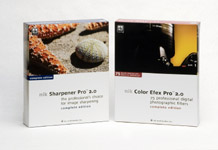 If
you own Adobe Photoshop or one of the many other imaging products
that support the Adobe plug-in architecture (like Jasc Paint Shop
Pro, Corel Photo-Paint, Ulead PhotoImpact, etc.), there are numerous
interesting third party filters and processors that can bring a
whole new dimensions to your pictures. Some are basic, others powerful
and sophisticated. In this column Iāll discuss two fascinating high-end
products from nik multimedia, Inc.
If
you own Adobe Photoshop or one of the many other imaging products
that support the Adobe plug-in architecture (like Jasc Paint Shop
Pro, Corel Photo-Paint, Ulead PhotoImpact, etc.), there are numerous
interesting third party filters and processors that can bring a
whole new dimensions to your pictures. Some are basic, others powerful
and sophisticated. In this column Iāll discuss two fascinating high-end
products from nik multimedia, Inc.