 |
|
|||||||||
|
|
Reviews
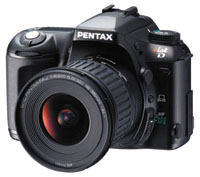
Nowadays, about the only thing Pentax can get some chiding about is the *ist Dās name, which has drawn more flack than an enemy bomber over London during the Blitz. Ignore the "*" and just say "ist dee." Pentax says the camera was named to be reminiscent of doing well at something (obviously, not naming stuff). The dictionary defines "ist" as a suffix used for one who specializes in a skill, like violinist, bigamistö you get the idea. Now, on to the meat. Unlike most of its competitorsā cameras, which get heavier with each hour of use, you can shoot with the *ist D all day an not feel excessively fatigued. But thatās also its Achilles heel. The grip is not quite big enough and unless you have small hands, itās hard to get comfortable holding the camera. If the shutter release button was located about a quarter-inch to the left, the problem could be solved without enlarging the grip. As it is, though, your right hand starts to feel scrunched after awhile. OK, itās not a killer but it can be irksome. While weāre on the downers, the CF memory card was almost impossible to remove when the camera first arrivedö it didnāt pop out far enough to grab with two fingers and you couldnāt extract it using a fingernail to hook its lip because that side of the card sits flush against the battery compartment. The camera had to be vigorously shaken to dislodge the card after the eject button was pressed, though after a few dozen insertions/retractions it became easier. A more serious gaffe is a mushy four way rocker switch that doesnāt always give a positive response on the first push. This definitely needs a fix.
On the upper right deck, a dial surrounding the shutter-release button turns the camera on and off and, when swung to its extreme clockwise position, lets you preview depth-of-fieldö your range of sharpness at the cameraās chosen aperture. Several other buttons used in conjunction with control dials set the flash options, self-timer, and burst mode (6 frames at 2.6 fps when used with a Sandisk Ultra II card). Thereās also a button that, when pressed, shows the correct shutter speed and aperture when youāre in manual exposure modeö a dynamite feature. Letās say you want to fiddle around with manual exposure settings. Simply hit the little green button for a starting point. Then change aperture or shutter speeds as desired. But you can always get back to the correct exposure by pressing the green button againö you donāt have to switch into another mode to find it.
Though you wouldnāt ordinarily think of the *ist D as a beginnerās camera, Pentax wasnāt missing a bet. Certain dials and controls are color-coded. Set all of these to the green setting and you have a sophisticated point-and-shooter that will perform perfectly. Then, as you get more into photography, you can learn all the other good stuff. The camera uses AA batteries instead of proprietary LiIons. Four Quest Platinum NiMH rechargeables were still good-to-go after 400 frames, though thatās when I usually replaced them. In a pinch, most any AA battery (even alkalines) will power the camera which means wherever in the world you are, youāll always have a source of juice. At first, I thought the *ist Dās images looked a bit soft until I realized that by not over-sharpening them in the camera, Pentax has eliminated most of the artifacts that appear during that process. You can sharpen pictures to your liking in an imaging program, which is how it should be done. But if you prefer, you still can make in-camera custom adjustments to increase sharpness, color saturation, and contrast.
Pentax incorporated some nice touches on this camera. The lens hood has a removable section at the bottom to give you easy access to polarizers and split-field neutral density filters that require rotation. And itās one of the few digital cameras in the world that can shoot up to nine multiple exposures on a single frameö photograph the moon, for example, and then put it anywhere in a moonless sky or just let your creativity run wild. Though the *ist D has its faults (and what camera doesnāt?), it is outstanding where it countsö taking excellent images. It accepts most of Pentaxās bayonet lenses as well as their earlier, inexpensive M-42 screw-mount lenses (with an adapter). Or you can shoot with their new digital 16-45mm (24mm-68mm equiv) wide-zoom which is a phenomenal piece of glass. Having given the *ist D a professional workout, I found it to be an most impressive camera that will do just about anything you want it to. Iām sure going to miss it. öArthur
Bleich
|
||||||||
|
|
|||||||||
|
©
Digital Camera Magazine. All Rights Reserved. |
|||||||||
 Pentax
*ist D SLR
Pentax
*ist D SLR As
with most DSLRs the *ist D is festooned with buttons, dials, and
switches to quickly allow access to frequently-used functions without
menu diving. The front of the camera has a switch for single, continuous
or manual focus and a button to set custom white balance. On the
top left, a multi-function dial handles auto, program, shutter or
aperture priority, manual exposure, and a bulb setting for long
exposures. The same dial sets the ISO (200-3200), resolution, and
white balance. Reminder: After using any of the last three settings,
remember to turn the dial back to one of the exposure functions
or the camera wonāt shoot. A ring nestled underneath the multi-function
dial sets the metering modeö matrix, center-weighted or spot.
As
with most DSLRs the *ist D is festooned with buttons, dials, and
switches to quickly allow access to frequently-used functions without
menu diving. The front of the camera has a switch for single, continuous
or manual focus and a button to set custom white balance. On the
top left, a multi-function dial handles auto, program, shutter or
aperture priority, manual exposure, and a bulb setting for long
exposures. The same dial sets the ISO (200-3200), resolution, and
white balance. Reminder: After using any of the last three settings,
remember to turn the dial back to one of the exposure functions
or the camera wonāt shoot. A ring nestled underneath the multi-function
dial sets the metering modeö matrix, center-weighted or spot.  At
the back and left side of the camera are additional controls that
handle bracketing, auto exposure/focus lock, exposure compensation
(which appears on a bar graph in the viewfinder), focus point selection,
menu access, picture deletion, photo review, and information about
how the picture was shot. Thereās also a combined USB/ Video-out
port, an electronic cable release socket, a 6.5 volt DC-in socket,
a flash hot shoe, and a pc-flash receptacle for connecting to off-camera
external flash units.
At
the back and left side of the camera are additional controls that
handle bracketing, auto exposure/focus lock, exposure compensation
(which appears on a bar graph in the viewfinder), focus point selection,
menu access, picture deletion, photo review, and information about
how the picture was shot. Thereās also a combined USB/ Video-out
port, an electronic cable release socket, a 6.5 volt DC-in socket,
a flash hot shoe, and a pc-flash receptacle for connecting to off-camera
external flash units.  The
*ist D has a very large and bright viewfinder which is a joy to
look through. Itās shot-to-shot time is just about as fast as you
can press the shutter release button. Lag is a thing of the past.
Even when the buffer is full, you can keep taking pictures at about
a second apartö you donāt have to wait until theyāre all processed.
The camera can be set to instantly review images but thereās no
histogram overlay to check your exposure. Itās not fatal, though,
because instant review usually slows down shooting and should be
turned off. If you want to check exposure, you can easily do so
by pressing the playback button followed by the info button and,
voila, the histogram appears.
The
*ist D has a very large and bright viewfinder which is a joy to
look through. Itās shot-to-shot time is just about as fast as you
can press the shutter release button. Lag is a thing of the past.
Even when the buffer is full, you can keep taking pictures at about
a second apartö you donāt have to wait until theyāre all processed.
The camera can be set to instantly review images but thereās no
histogram overlay to check your exposure. Itās not fatal, though,
because instant review usually slows down shooting and should be
turned off. If you want to check exposure, you can easily do so
by pressing the playback button followed by the info button and,
voila, the histogram appears.