|
Reviews
Sigma SD10
 When
I tested this cameraās predecessor, the Sigma SD9, I was displeased
that it was so obviously a digital back grafted onto a film SLR
camera. Apparently I was not the only one to raise issues with the
SD9, and it seems that Sigma has listened and incorporated many
improvements in the new SD10. My main beef with the SD9 was the
necessity to use two totally different battery types to run the
camera, one kind for the camera body and another for the digital
back. The SD10 uses only one battery type to run everything, CR-V3
Lithium cells. It uses two of them in a battery holder that slides
into the bottom of the camera. You can also use 4 AA cells or a
dedicated AC adapter. Although not available for my test, I think
I would have preferred to have run the camera from the optional
Battery Grip, which holds four CR-V3 or eight AA cells and allows
for a more comfortable grip when shooting vertical photos. Without
this optional grip I found shooting verticals, which I do most of
the time, awkward. When
I tested this cameraās predecessor, the Sigma SD9, I was displeased
that it was so obviously a digital back grafted onto a film SLR
camera. Apparently I was not the only one to raise issues with the
SD9, and it seems that Sigma has listened and incorporated many
improvements in the new SD10. My main beef with the SD9 was the
necessity to use two totally different battery types to run the
camera, one kind for the camera body and another for the digital
back. The SD10 uses only one battery type to run everything, CR-V3
Lithium cells. It uses two of them in a battery holder that slides
into the bottom of the camera. You can also use 4 AA cells or a
dedicated AC adapter. Although not available for my test, I think
I would have preferred to have run the camera from the optional
Battery Grip, which holds four CR-V3 or eight AA cells and allows
for a more comfortable grip when shooting vertical photos. Without
this optional grip I found shooting verticals, which I do most of
the time, awkward.
The
most important innovation of the Sigma SD10 is the incorporation
of Foveonās latest X3 image sensor. This new sensor produces a 10.2
megapixel output, 3.4 megapixels in each color channel. Unlike conventional
sensors that use mosaic pattern and interpolation software to produce
full color images, Foveon goes their own way and produces sensors
with three layers of photosensitive silicon receptors. These are
stacked on top of each other just like the emulsion layers in a
color film. Directly recording colors at all pixel locations provides
much more accurate colors and no artifacts from interpolation, according
to Foveon. Foveon also claims higher resolution from their sensors.
 All
of this sounds really great in theory, but what about in practice.
Although I had some qualms about the design of the camera, my earlier
tests with the Sigma SD9 convinced me that Foveonās sensor design
was capable of producing excellent image quality. I was even more
impressed this time around. I was only able to do a couple of shoots
with the camera if I was going to finish this article in time, so
please donāt consider this an in-depth evaluation. It is more of
an appetizer than a main course. The first thing I realized when
shooting the largest sized images (2268 X 1512 X 3) was that I could
outrun the camera very quickly, and I ended up having to sit and
wait for the camera to write to the memory card and catch up with
me. The specifications say I should be able to shoot one image every
1.9 seconds up to six frames, and thatās about what I got in my
tests. But what it doesnāt tell you is that you then have to wait
quite a while before you can shoot again. I found this constant
interruption of the flow of my shoot very annoying. Of course choosing
one of the two smaller image sizes (1512 X 1008 X 3 or 1134 X 756
X 3) speeds things up, but I wanted the largest possible images
for my tests. I could not find anything in the product specifications
about the buffer memory size, but whatever it is it should be made
larger to prevent this problem. Of course those who do not do their
photo shoots in a rapid-fire way like I do may never run into this
particular problem. All
of this sounds really great in theory, but what about in practice.
Although I had some qualms about the design of the camera, my earlier
tests with the Sigma SD9 convinced me that Foveonās sensor design
was capable of producing excellent image quality. I was even more
impressed this time around. I was only able to do a couple of shoots
with the camera if I was going to finish this article in time, so
please donāt consider this an in-depth evaluation. It is more of
an appetizer than a main course. The first thing I realized when
shooting the largest sized images (2268 X 1512 X 3) was that I could
outrun the camera very quickly, and I ended up having to sit and
wait for the camera to write to the memory card and catch up with
me. The specifications say I should be able to shoot one image every
1.9 seconds up to six frames, and thatās about what I got in my
tests. But what it doesnāt tell you is that you then have to wait
quite a while before you can shoot again. I found this constant
interruption of the flow of my shoot very annoying. Of course choosing
one of the two smaller image sizes (1512 X 1008 X 3 or 1134 X 756
X 3) speeds things up, but I wanted the largest possible images
for my tests. I could not find anything in the product specifications
about the buffer memory size, but whatever it is it should be made
larger to prevent this problem. Of course those who do not do their
photo shoots in a rapid-fire way like I do may never run into this
particular problem.
The
Sigma SD10 records images only in its native RAW file mode, producing
files with the XF3 suffix. By now I am so used to viewing camera
RAW files with Photoshop CS that it did not occur to me that Photoshop
CS could not open XF3 files. Alas, it canāt, although Adobe says
they will release a new plug-in late this year to allow Photoshop
CS to read XF3 files. I wish Sigma and Foveon had spent their time
developing a Photoshop plug-in to read their files rather than their
own somewhat clunky Photo Pro file browser. Before I could work
on my images in Photoshop I first had to batch process them in Photo
Pro and convert them to either JPEG or TIFF. This takes 30 seconds
to a minute each, so it is a lot of down time waiting before you
can work on your images. If I were seriously considering buying
a Sigma SD10, I think I would wait until Photoshop CS can directly
work with the files, as I found this process of having to use Photo
Pro first somewhat ridiculous.
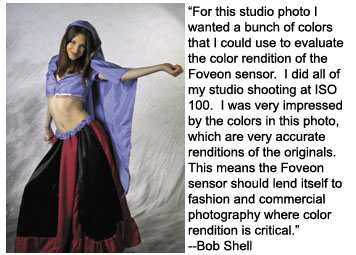
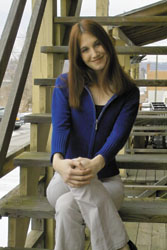 How
about image quality? Is it good enough to make up for the hassle
of getting at the images? The answer has to be a qualified yes.
Images shot in my studio with studio flash and images shot outdoors
under an overcast sky showed exceptionally good color rendition
and particularly good flesh tones. I really didnāt need to tweak
the color or contrast as I so often do with other digital cameras.
The images reproduced here with this article are straight images,
with nothing done to them other than resizing for magazine repro.
They are exceptionally good by any standard. I would have no hesitation
in using this camera for serious commercial photography based solely
on image quality and size. How
about image quality? Is it good enough to make up for the hassle
of getting at the images? The answer has to be a qualified yes.
Images shot in my studio with studio flash and images shot outdoors
under an overcast sky showed exceptionally good color rendition
and particularly good flesh tones. I really didnāt need to tweak
the color or contrast as I so often do with other digital cameras.
The images reproduced here with this article are straight images,
with nothing done to them other than resizing for magazine repro.
They are exceptionally good by any standard. I would have no hesitation
in using this camera for serious commercial photography based solely
on image quality and size.
The
SD10 offers ISO equivalent settings from 100 to 1600. Note that
I found ISO 200 ideal for general outdoor works, with ISO 400 an
option for dimmer light. I would only use ISO 1600 when I just had
to get the picture and could live with the relatively high noise
levels present at that speed.
The
GUI for Sigma/Foveonās Photo Pro browser allows you to view FX3
files from the SD10 and convert them to files that you can work
with in Photoshop or other similar applications. I would have been
much happier with a Photoshop plug-in than with this stand-alone
software that is just one more thing to learn. Most of us would
be doing our final work on our files in Photoshop anyway.
öBob
Shell
Home
|